
Use of the Download to Excel button is described in "Printing Lists of Candidates"
Here's how:
 1. Bring up some applications you wish to
export. This can be a "find by last name" or a search from the "Find Applications' Tab.
1. Bring up some applications you wish to
export. This can be a "find by last name" or a search from the "Find Applications' Tab.
2. You can export the entire list of applicants or just a select few by placing a check in the checkbox next to them. If no applicants are checked, then the entire list will be downloaded. Note: downloading more than 50 applicants at a time may take a greater amount of time.
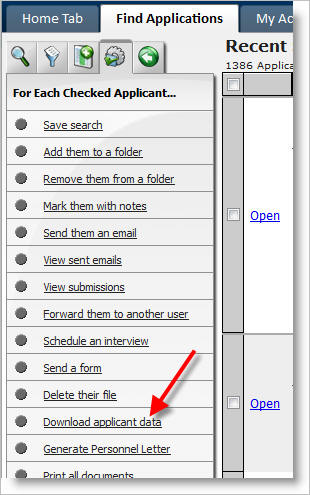
3. Click on 'Download applicant data' link on left side.
4. A "Download Applicant Data" window will appear giving you different options for the format and applicant field set to be exported.
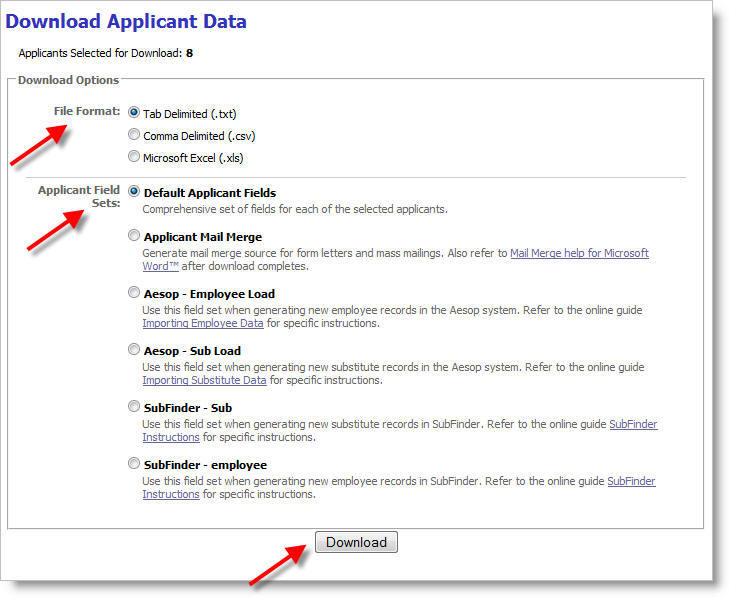
The available file formats are:
- Tab Delimited (.txt)
- Comma Delimited (.csv)
- Microsoft Excel™ (.xls)
The default field sets are as follows. Contact our support group if you require an alternate field set to those provided.
5. From the dialog box that appears, select the option to Save the file.
6. In the Save File dialog box that appears, select a location on your machine or network to save the file, and give the file a name.
7. At this point, you may import the data into various payroll, financial, or analysis programs.
Field Set Specifications:
This information may be required by any third-party system that will be processing the data.
Sample Field Set: Default Applicant Fields in tab-delimited (.txt) format.
| Field | Data Type | Comments | |
| Header Record: | |||
| Contains Column Headers | |||
| Last Field | String | "**EndOfHeader**" | |
| Detail Record: | |||
| Applicant Number | Integer | Unique Reference to Application | |
| Email Address | String | ||
| First Name | String | ||
| Middle Initial | String | ||
| Last Name | String | ||
| Other First Name | String | ||
| Other Middle Initial | String | ||
| Other Last Name | String | ||
| Address 1 | String | ||
| Address 2 | String | ||
| City | String | ||
| State | String | ||
| Zip | String | ||
| Area Code | String | ||
| 7 digit Phone | String | ||
| Perm Address 1 | String | ||
| Perm Address 2 | String | ||
| Perm City | String | ||
| Perm State | String | ||
| Perm Zip | String | ||
| Perm Area Code | String | ||
| Perm 7 digit Phone | String | ||
| School 1 Name | String | ||
| School 1 City | String | ||
| School 1 State | String | ||
| School 1 Major | String | ||
| School 1 Minor | String | ||
| School 1 GPA | String | ||
| School 1 Degree | String | ||
| School 1 Graduated | String | ||
| School 2 Name | String | ||
| School 2 City | String | ||
| School 2 State | String | ||
| School 2 Major | String | ||
| School 2 Minor | String | ||
| School 2 GPA | String | ||
| School 2 Degree | String | ||
| School 2 Graduated | String | ||
| School 3 Name | String | ||
| School 3 City | String | ||
| School 3 State | String | ||
| School 3 Major | String | ||
| School 3 Minor | String | ||
| School 3 GPA | String | ||
| School 3 Degree | String | ||
| School 3 Graduated | String | ||
| Job 1 Employer | String | ||
| Job 1 City | String | ||
| Job 1 State | String | ||
| Job 1 Phone | String | ||
| Job 1 Title | String | ||
| Job 1 May We Contact | String | ||
| Job 1 Pay | String | ||
| Job 2 Employer | String | ||
| Job 2 City | String | ||
| Job 2 State | String | ||
| Job 2 Phone | String | ||
| Job 2 Title | String | ||
| Job 2 May We Contact | String | ||
| Job 2 Pay | String | ||
| Job 3 Employer | String | ||
| Job 3 City | String | ||
| Job 3 State | String | ||
| Job 3 Phone | String | ||
| Job 3 Title | String | ||
| Job 3 May We Contact | String | ||
| Job 3 Pay | String | ||
| Certificate Number | String | ||
| Certificate Status | String | ||
| Endorsement 1 | String | ||
| Endorsement 2 | String | ||
| Endorsement 3 | String | ||
| End of Record marker | String | "**EndOfApplicant**" | |
| Trailer Record: | |||
| Applicant Count | String | "Applicants = " number of applicants | |
| Detail Record Count | String | "DetailRecords = " number of detail records | |
| End of File marker | String | "**EOF**" |